
ATHENA
Senitron’s RFID Asset Tracking, Inventory, and Automation Software
Retail | Warehouse & Distribution | Industrial & Manufacturing | Personnel Tracking
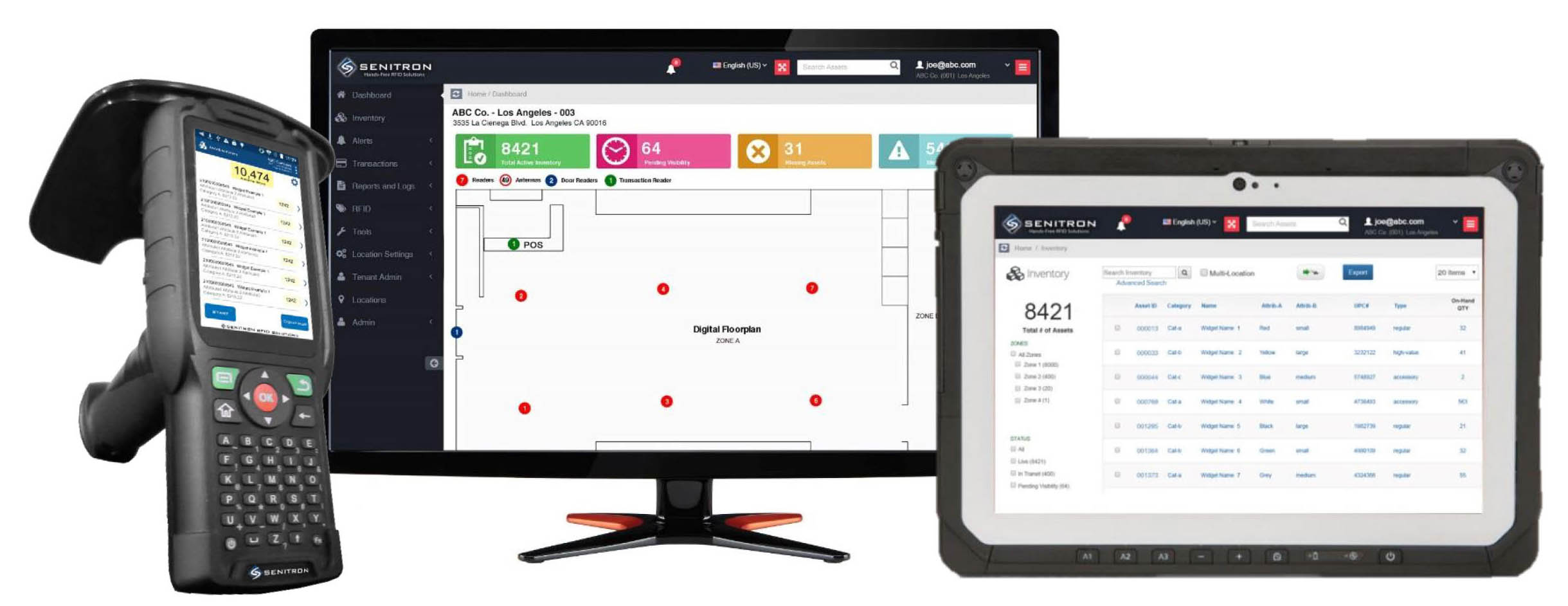

Senitron’s Athena platform is an all-in-one RFID software solution for printing, encoding, tracking, inventorying, and automating RFID assets through organizations. It drives real-time access to the information such as inventory, asset location, and automation through hand-held and hands-free RFID readers. Designed on a scalable platform, the Athena solution integrates into a variety of host systems and works with the latest hardware technologies. Athena has powered innovative solutions in a variety of industries including, but not limited to, manufacturing, healthcare, logistics, and retail.
Track equipment, devices and tools across every site with Senitron’s RFID asset tracking software: audits in minutes, check-out and hands-free tracking.
Automated Shipment Receiving Auditing

Software Features
 |
Inventory & Tracking Real-time inventory quantities, current location, and movement history. |
|
Print RFID Tags Using the Senitron dashboard, or via Senitron’s plug-in which enables the any existing software to print RFID tags. |
|
Visual Map View of Assets See where the assets are located on the floorplan. (Easy 5-minute map setup!) |
|
Encode RFID Tags Encode RFID tags on an encoder pad, using the Senitron dashboard. |
|
Visual Display of Misplaced Items Senitron auto detects misplaced items, it shows you where they are, and where they need to be returned to. |
|
Multi-User System Create user roles, and provide access to specific pages and functions. |
|
RFID Transfer Slips / Automatic Receiving Become 400% more efficient by doing RFID transfer-slips. As shipments come in, they will be auto received and audited. |
|
Automatic Transfer Slips If assets are moved to another location without a transfer slip, the system auto detects the transfer and auto creates a slip. |
|
Theft / Unauthorized Alerts Assets which have not been sold, transferred-out, or white-listed, can set off an audio, SMS or email alert. |
|
Multi-Location |
|
Unauthorized Zone |
|
Send-To Hand-Held & Geiger |
|
Automated Replenishment Alerts |
|
Compare Inventory |
|
Reports |
|
Cloud / Local Server |
|
Integration |
|
RFID Reader Management |
|
Catalog Sync App |
|
RFID Assistant App & Transfer-Slip App |
Screenshots
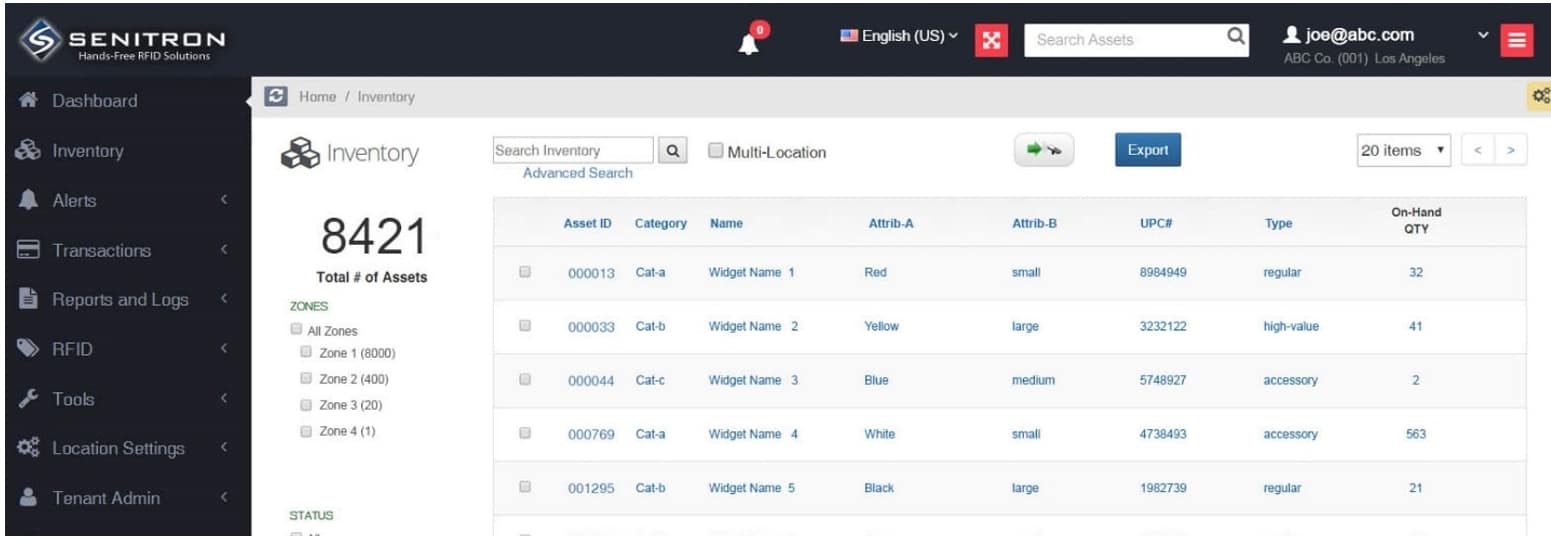
Inventory
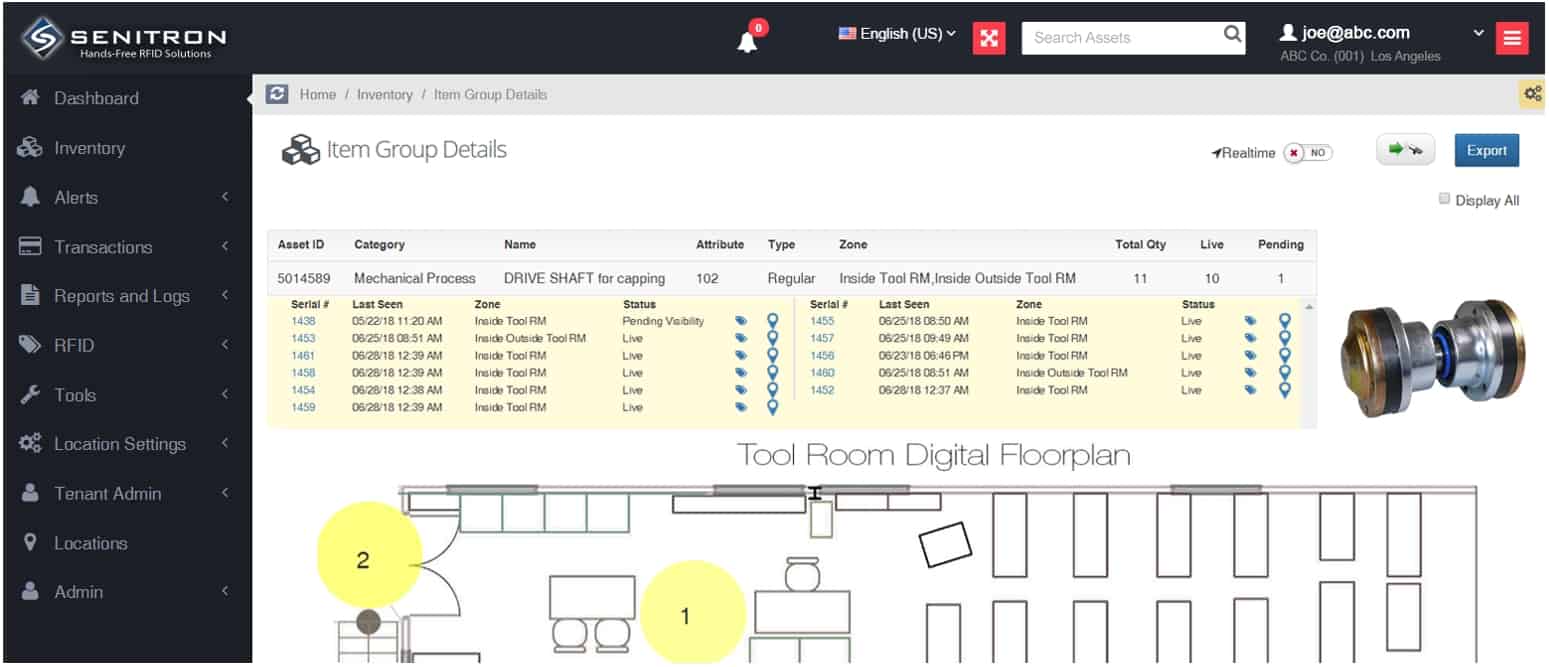
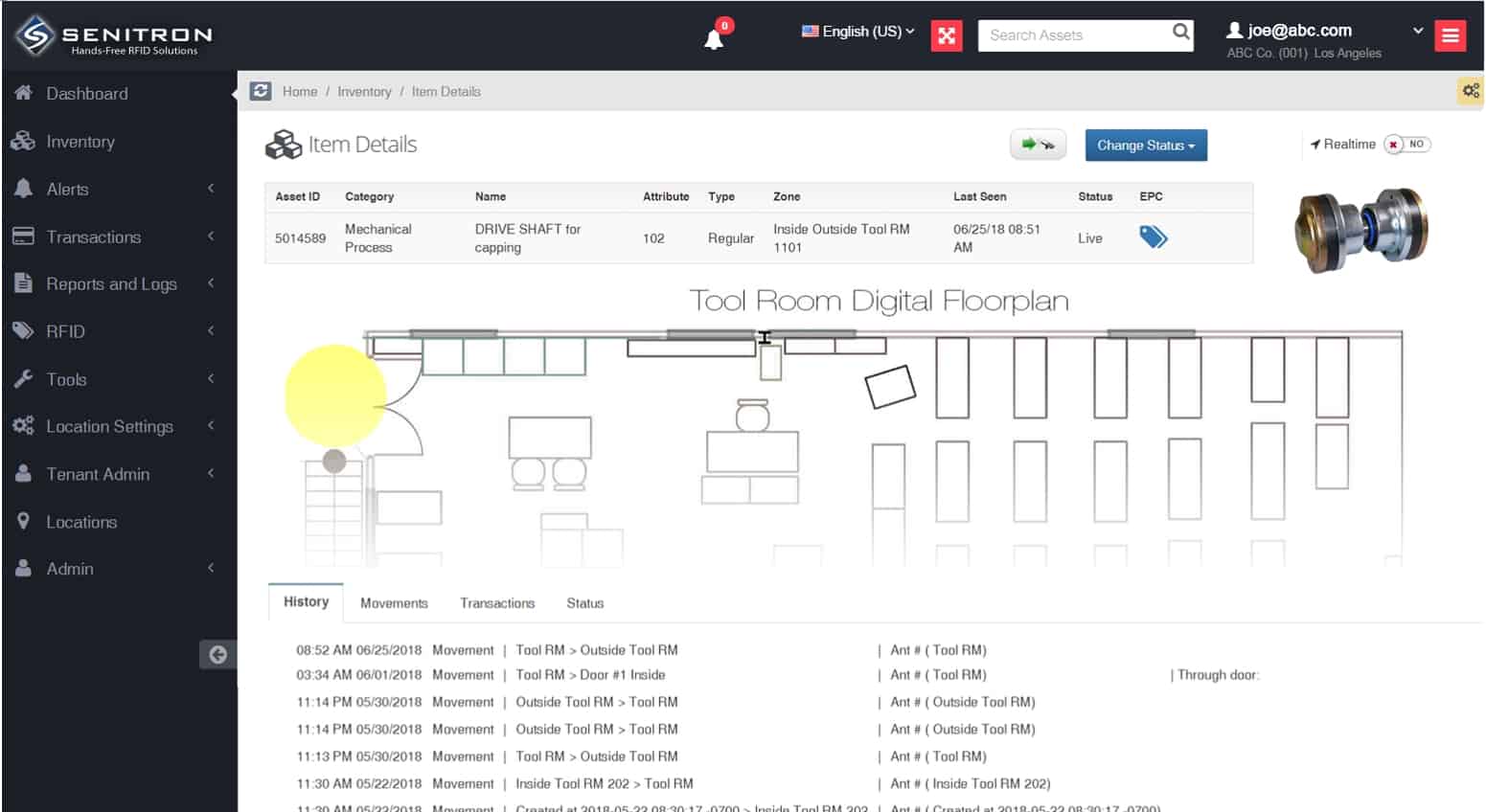
User can search the inventory by entering a part #, item#, sku#, name, description, or they can simply browse and filter by zone, category and more. Various inventory screens will allow the user to drill in deeper to see more data about a single asset or a group of assets.
On-Hand Quantity View
Asset Group Detail View
Specific Asset Detail View with History
Print / Encode RFID Tags
“Unlike most other solutions, you don’t need to use a 3rd party label printing software.” You can Print or Encode RFID tags on the fly using the Athena dashboard, or via your organizations existing ERP / WHM / POS software.
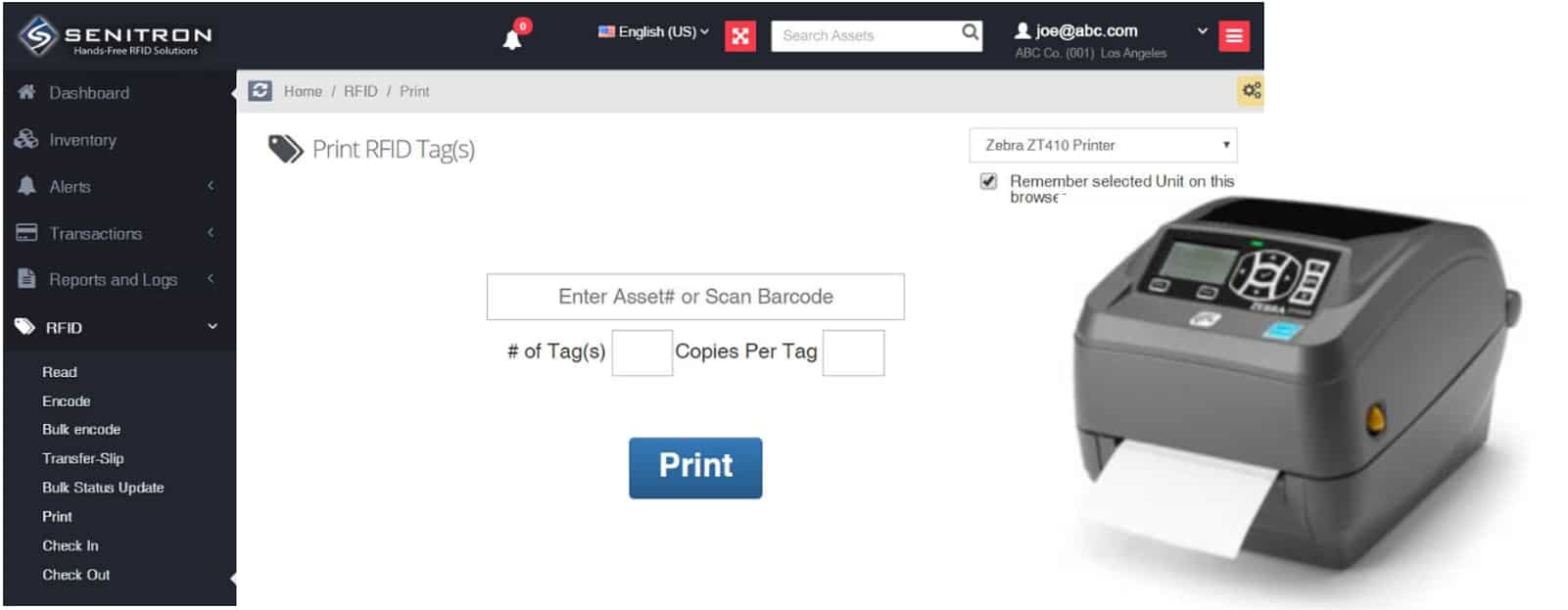
Option 1 – Print RFID Labels from the Senitron Cloud Dashboard
Print RFID tags, by entering an item number and clicking the print button
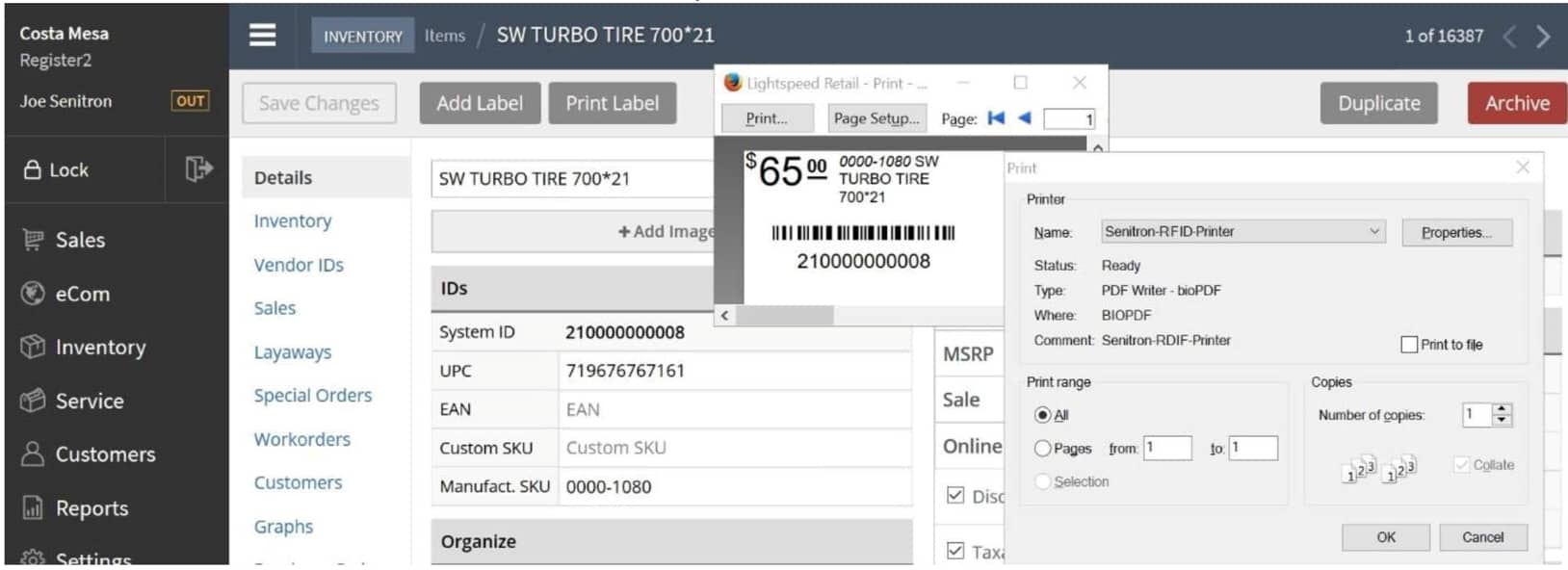
Option 2 – Print RFID Labels from your existing Organization Software
Senitron will install its propriety RFID printer software on your computer, which will enable your existing ERP, WHM, or POS software to print RFID labels. The example below is Lightspeed POS. Other clients are using it with Retail Pro, SAP, Oracle, Counter Point.
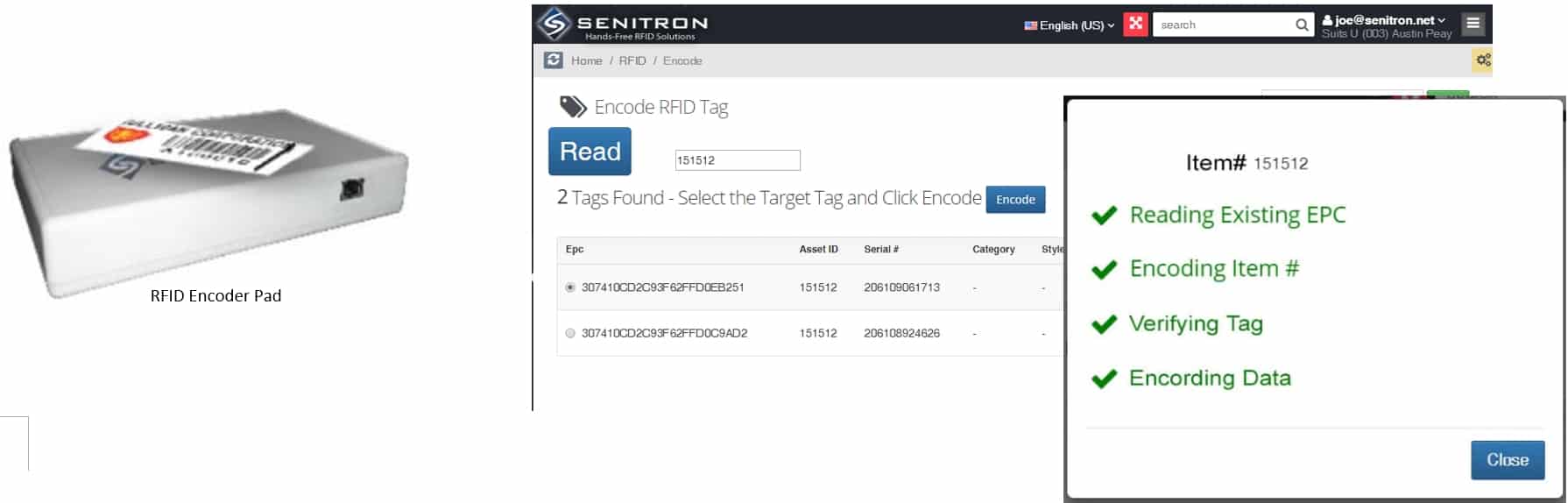
Option 3 – Encode Tags for Hands-Free RFID Tracking
Place one or more RFID tags on the RFID encoder pad, enter the item number and click Encode.
RFID Transfer Slip + Automatic Transfer Slips
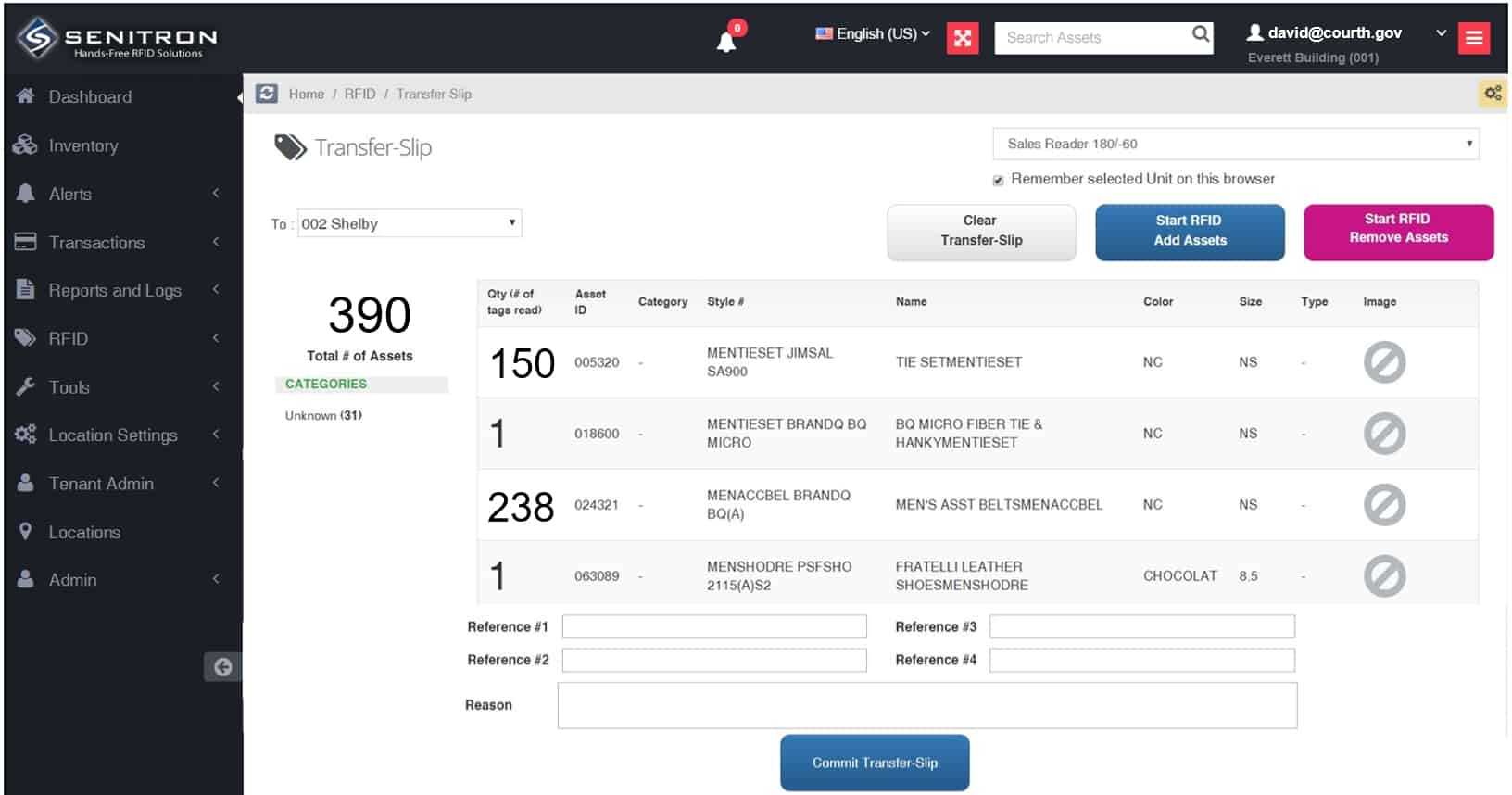
Creating transfer-slips with RFID will improve speed and efficiency by 400%. And on the receiving end, receiving and auditing incoming shipments will see a 400% improvement in speed and efficiency. Forgot to create a transfer slip? not to worry, the system will auto detect and auto create transfer slips and move the items to the new location.
Option 1 – Create RFID transfer slips directly from the Senitron RFID dashboard Using Fixed RFID
Option C – Organizations / other Software vendors, can do a more in-debt integration with Senitron, by adding an RFID scan button into their app. Senitron will provide the specifications and API documents and support to the software vendor integration team. For example Retail Pro POS, software had direct integration with Senitron. Thus on all the screens such as sales screens, transfer slip screens, etc, there is an Senitron RFID scan button. When pushed the RFID data is read directly into Retail Pro. Once committed, the transfer slip data is committed via API to Senitron’s software.
Option 2 – Create RFID transfer slips using Senitron’s Windows / Mac OSx Desktop Application
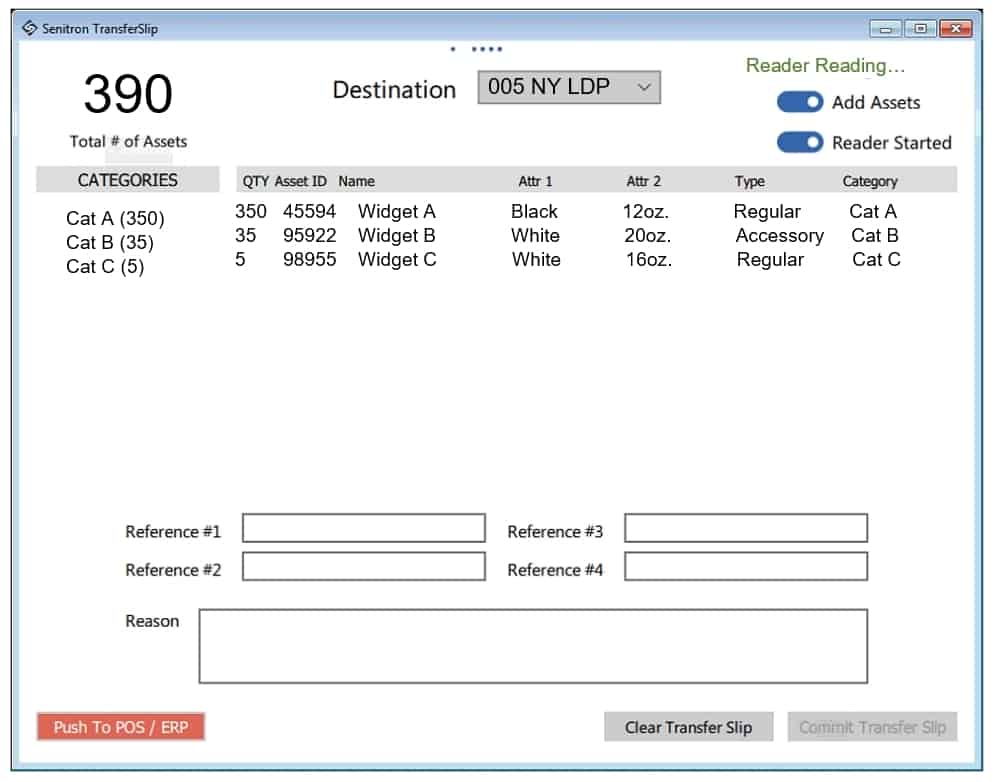
Optional: Organizations that have an existing software, such as SAP, Oracle, WHM, ERP, or POS software can take advantage of the “Push To POS / ERP” button, which targets and populates the transfer-slip screen on the organizations other exist software (example SAP). This way both Senitron and the organization software will have the transfer-slip data. Alternatively the transfer slip data can be communicate to the other systems via API’s or CSV exports.
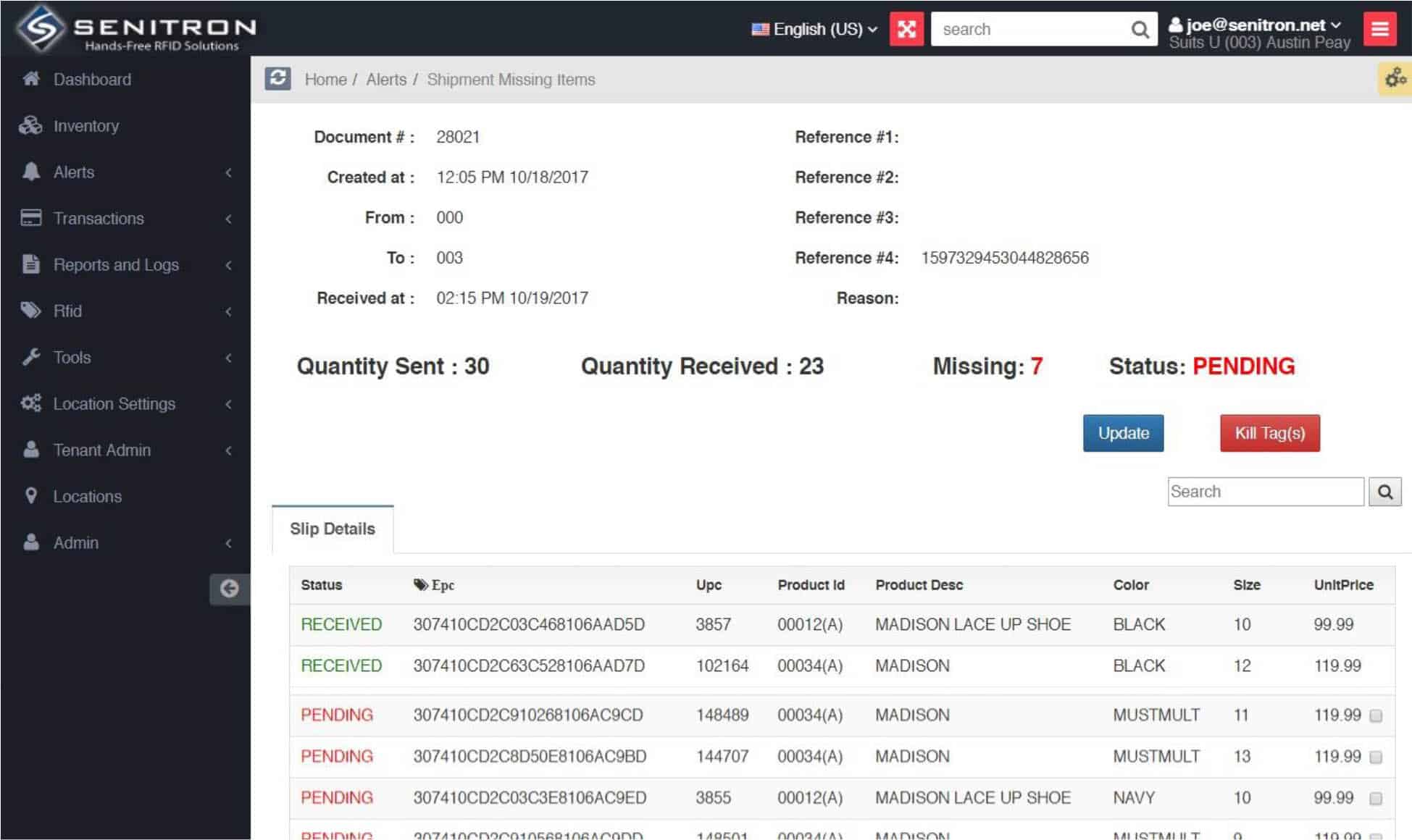
Automated Shipment Receiving Auditing
As if RFID transfer slips aren’t cool enough, Senitron’s technology makes everything even cooler when the delivery truck brings the merchandise to the location which was meant to receive the shipment. As soon as even one item from the shipment is received the shipment voucher is marked as received in Senitron, and as every item is seen by the RFID readers, they are automatically marked to received. If in four hours of delivery all the items in the shipment are not visible and not received store management will get an email alert to address or report the issue. If in 24 hours all items are not received or addressed, headquarters will receive an email alert that the store is not following protocol.
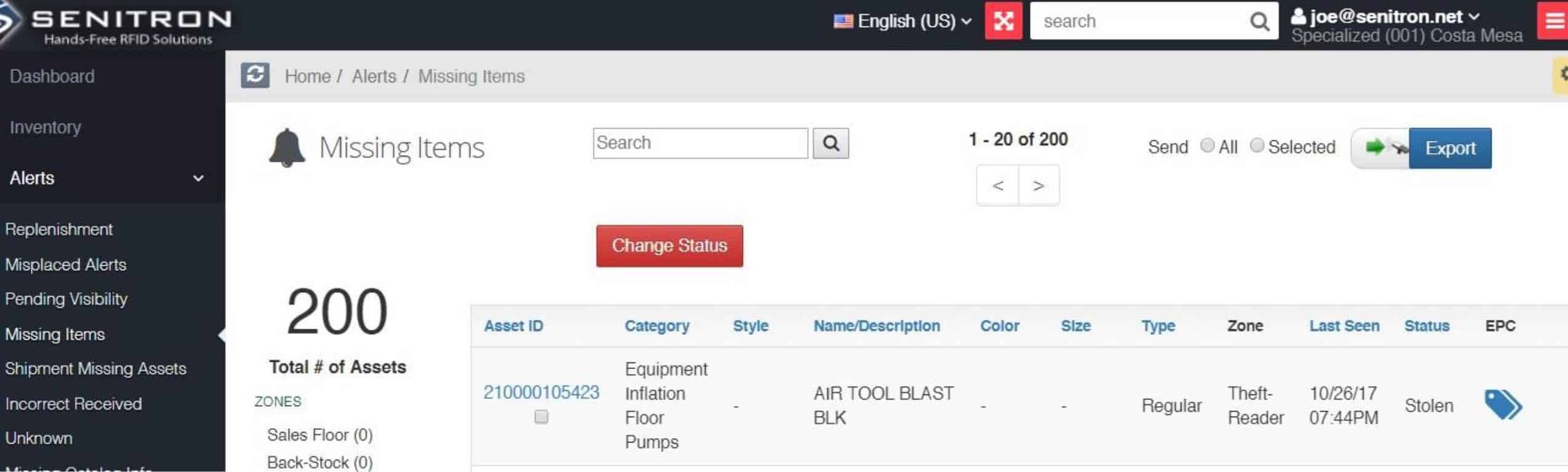
Real-Time Unauthorized Alerts
Receive Realtime alerts if unauthorized assets leave the premises, or if they are detected in unauthorized zones, via audio, email, text, or on-screen.

POS Integration & The Senitron POS Assistant App
Senitron’s solution can be used in conjunction with any existing POS system, such as Retail Pro, Lightspeed POS, Counter Point, etc. Depending on how the Senitron software is being utilized, one option is to inform Athena; when a product is sold via an external POS software, for two reasons. (1) the item will be marked sold in Senitron as well, and removed from the Senitron inventory quantity; (2) the item will be whitelisted, so that the RFID readers by the exit point do not set off an alert.
Method 1 – Cloud-Dashboard
Assets can be marked to sold/ decommissioned from the Senitron Cloud Dashboard, by personnel with the proper credentials. The user can scan or select the asset, and click the change status button on the dashboard for that item, and select to “Decommission” the tag.

Method 2 –Senitron’s Windows Desktop App “POS Assistant”
Assets can be removed / sold via Senitron Windows Desktop App, called POS Assistant. This app usually sits on top of other POS apps, and can be used to quickly mark items to sold status. This app is also capable of populating the POS sales screen at the same time, as it read RFID assets for sale.

Method 3 – Assets can be removed / decommissioned via API from a 3rd Party software, such as a POS software, WHM software, or ERP software. This would entail doing integration work between the two systems. Note : Senitron integration is already available for Lightspeed POS, Retail Pro, and Counterpoint POS.
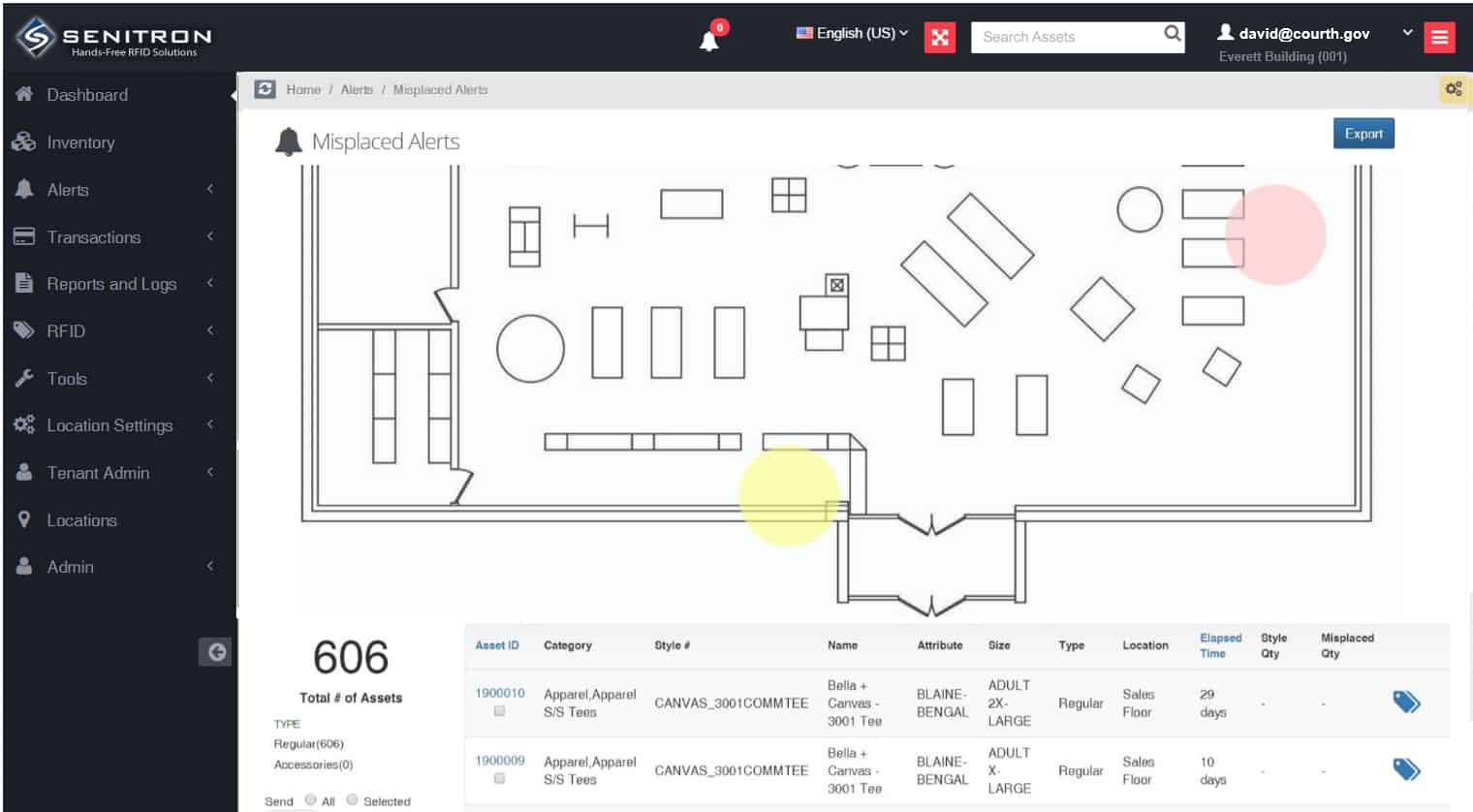
Misplaced Items Detection & Visual Display
To help personnel locate and return misplaced or separated items from their groups, the system displays the location of the misplaced items within the location floor plan, as well as their group locations.
Multi-Location / Multi-User Platform
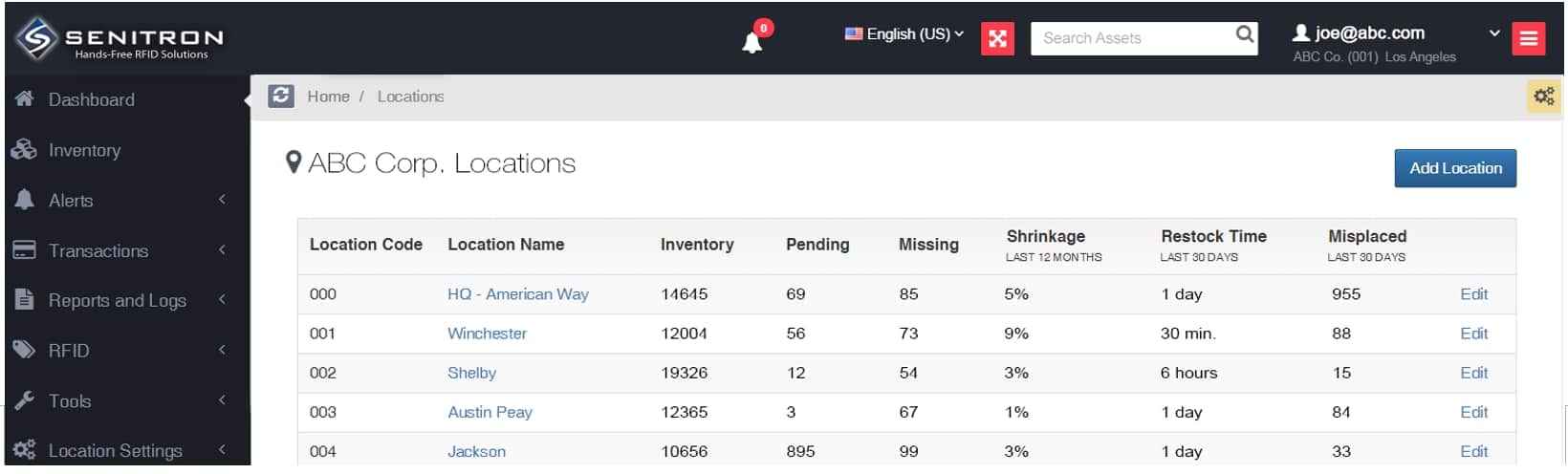
Create any number of users, based on the plan, with various permission levels and grant them access to one or more locations.
Hands-Free RFID The Athena platform is 100% compatible with hand-held RFID readers. Users can scan and upload the inventory directly to the dashboard as often as desired. Important note: Using hand-held RFID is not exclusive, meaning clients may do hybrid solutions, where portions of a location are addressed using hand-held RFID, while other areas are covered with hands-free RFID. In all scenarios it is recommended that hands-free RFID hardware is deployed at the exit points to capture and alert theft (unauthorized removal of an asset from the premise) Hand-held RFID is recommended and suggested in the following scenarios:
- Assets that can use RFID labels with the size of 2.5×1.5 inches and larger.
- Organization that prefer to have continuous monitoring and tracking of assets.
- Unlock the many benefits of RFID automation
Hand-Held Basics Video https://www.youtube.com/watch?v=dGBAW_pxtLA 
Hands-Free RFID  The Athena platform is 100% compatible with hands-free RFID readers. Fixed RFID readers can be deployed to ceilings, walls, shelves, exit points, shipping docks, etc. Once activated, the fixed RFID readers will continue to read and feed the flow of RFID data into Athena. Important note: Using hands-free RFID is not exclusive, meaning clients may do hybrid solutions, where portions of a location are addressed using hand-held RFID, while other areas are covered with hands-free RFID. In all scenarios it is recommended that hands-free RFID hardware is deployed at the exit points to capture and alert theft (unauthorized removal of an asset from the premise) Hands-free RFID is recommended and suggested in the following scenarios:
- Assets that can use RFID labels with the size of 2.5×1.5 inches and larger.
- Organization that prefer to have continuous monitoring and tracking of assets.
- Unlock the many benefits of RFID automation